 LeadShark
Best Trigify Alternatives in 2026, Now That Trigify Has Shut Down
By Ruz, Founder LeadShark. Updated Oct 26, 2026
Trigify is gone. On September 23, 2026 the Trigify team announced it was joining HubSpot and retiring the standalone platform. For most customers, access ended at 11:59pm BST on October 22, 2026. Integrations, API access, monitoring and signal collection stopped at the same moment. Accounts are not being migrated, the product is not coming to HubSpot, and subscriptions won't renew. Some contracts have their own end date, so check your agreement if you still have access.
If you ran Trigify, something in your stack went quiet last week: a Clay table, a Zap, a webhook, a Slack channel or a CRM sync. Here's what you need to do now:
- Export anything you can still reach. If your contract runs past October 22, download your lists before your own end date.
- Write down which Trigify jobs you actually used. Most teams used one or two: who engaged with posts, tracked people and companies, keyword listening, or pushing leads into a CRM or sequencer.
- Replace each job, not the whole tool. No single product below does everything Trigify did, and that's fine.
I built LeadShark, so it's first on this list. Keep that in mind. LeadShark covers the post engagement side of Trigify and adds the part Trigify left to other tools: replying to and messaging the people who engage. It doesn't do always-on keyword alerts, and I'll say so below. Every other tool is reviewed from its own pricing page as of Oct 26, 2026.
The short version
| Tool | Best for | Starting price | Key difference vs Trigify | Review |
|---|---|---|---|---|
| LeadShark | Exporting who engaged with posts, then turning engagers into leads | $39/mo | Engager CSVs for your posts and other people's posts, plus comment-to-DM on every plan | Jump to review |
| Teamfluence | Teams that want a done-with-you LinkedIn signals setup | €449/mo | Unlimited seats; offers Trigify users price-matching and a free migration | Jump to review |
| OutX | Always-on LinkedIn keyword and profile tracking | Free, paid from $99/mo | Keyword listening and profile tracking with set data refresh times | Jump to review |
| Clay | Rebuilding Trigify-fed tables and enrichment workflows | Free, paid from $167/mo | Enrichment and signal workflows across 150+ data providers | Jump to review |
| Trigify | Engagement and intent signals pushed to your stack | Shut down Oct 22, 2026 | What you're replacing | Full comparison |
Prices are monthly, in the currency each tool lists, checked on Oct 26, 2026.
1. LeadShark: best Trigify alternative for post engagers
Trigify told you who engaged. LeadShark tells you who engaged and then answers them.
The most common Trigify job was simple: find the people who reacted to or commented on a LinkedIn post, yours or someone else's, and get them into a list. LeadShark does that from the dashboard. Bookmark a person, open their posts, and download a CSV of everyone who reacted or commented. On your own posts you can export reactions, comments and reposts. And because comment-to-DM is the core of LeadShark, the people who comment on your posts get a public reply and a DM with your link, in under 10 minutes on average.
Who it's for: founders, creators and small sales teams who used Trigify mainly to pull engagers from LinkedIn posts, and who'd rather start the conversation than just log the signal.
Why it works for Trigify users:
- Engagers on other people's posts. Bookmark a competitor, an influencer or a prospect, open their posts and download the reactions or comments as CSV.
- Engagers on your own posts. Export reactions, comments and reposts from your Posts page.
- Signals on your own account. Heat-scored hot leads from the people who comment, react, repost, view your profile or click your link. CSV export of Signals is on Apex.
- Something happens after the signal. Comment-to-DM replies to commenters, connects with non-connections and sends the DM, on every plan.
- Your stack keeps getting data. Webhooks for new comments, captured emails and sent leads on every plan, plus a REST API.
- AI agent access on Apex. The Apex MCP lets Claude, ChatGPT or Cursor list the engagers of any post, search posts by keyword and pull a person's recent posts and activity when you ask.
Features:
- Bookmarks: save LinkedIn profiles with tags and notes, then open any bookmarked person's posts
- Reactions CSV for a bookmarked person's posts: reaction type, name, headline, profile URL and connection degree
- Comments CSV for a bookmarked person's posts: adds the comment text, date, and reply and reaction counts
- CSVs of a bookmarked person's connections and followers
- Your own posts: export reactions, comments and reposts
- Signals: heat-scored hot leads on Pro and up, CSV export on Apex
- Lead Magnet Radar (Discover): 100 posts on Pro, the full radar plus search on Pro+ and Apex
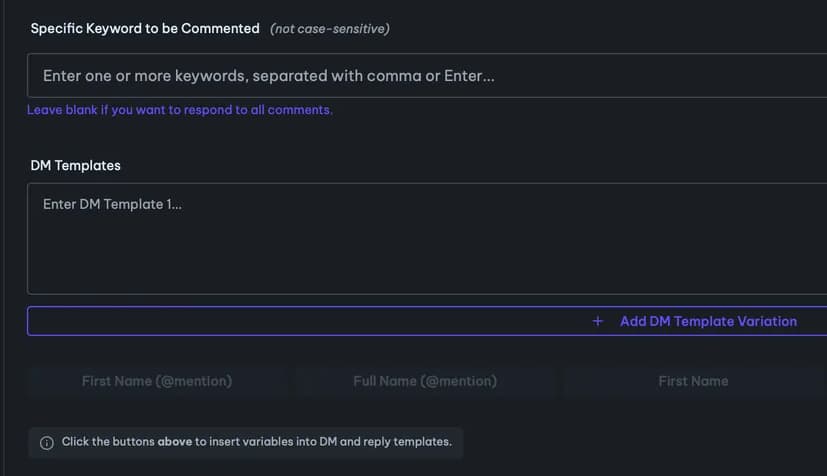
- Comment-to-DM with keyword triggers, or reply to every comment (how LinkedIn comment-to-DM works)
- Webhooks: new comment, email captured and lead sent on every plan; new connection request on Pro+; profile visit, new follower and new like on Apex
- MCPs for Claude, ChatGPT and Cursor (Pro+ and Apex). See the LinkedIn MCP server
- 0 to 250 DMs a day (150 recommended max), with warm-up mode, off-hours and human pacing
- One-time connect with our extension, then it runs in the cloud. Nothing to keep open.
Pricing:
| Plan | Monthly | Yearly | Running automations |
|---|---|---|---|
| Pro | $39 | $390 (2 months free) | 10 |
| Pro+ | $59 | $590 | 100 |
| Apex | $119 | $1,190 | Unlimited |
| APEX+ (agencies, 3 profiles) | from $186 | 1 Apex + 2 Pro+ |
7-day free trial on every plan. No card. Up to 50 DMs a day during the trial. See full pricing.
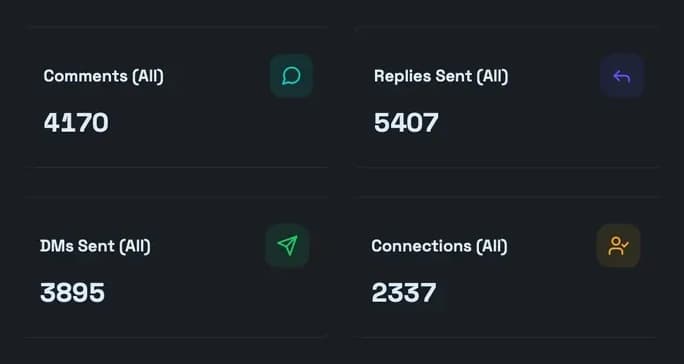
LeadShark by the numbers
- 3M comments captured
- 2.7M+ DMs delivered for 1,500+ creators
- 26K+ automations created
- 10M+ real LinkedIn actions
- Under 10 minutes average response time
- Live since September 2024
“I've spent over $10K trying different SaaS tools and platforms, creating custom workflows - LeadShark has been by far my favorite tool out of everything. It's generated me 20,000+ leads and helped me grow my brand significantly. Probably made me close to six figures just from distributing and nurturing these leads. There's a reason I always recommend it to everyone.”

Aryan Mahajan
Co-Founder, INSTIG8 AI
“I made $1,650.13 in 7 days from just 3 LinkedIn posts! LeadShark automatically sent 1,858 personalized DMs, delivered my lead magnet, and converted comments into customers. I didn't have to lift a finger.”

Dominik Jedro
Senior SEO Consultant / Author, JUST DIGITAL
“I started sharing all my notes on copywriting, go-to-market strategies, and lead generation on LinkedIn. Every time, they were going viral, and then even more viral. Last year, I had over 1M impressions, 10K comments, and booked hundreds of sales calls using this strategy. This would not have been possible without LeadShark. LinkedIn is now my best lead acquisition channel, on par with referrals.”

Phil Sergenti
Founder, FIRST
LeadShark vs Trigify
Here's each Trigify job and what replaces it in LeadShark, including the jobs LeadShark doesn't cover.
| Trigify job | LeadShark equivalent | How close |
|---|---|---|
| Who engaged with my posts | Signals (heat-scored) and reactions, comments and reposts exports from your Posts page | Covered |
| Who engaged with a competitor's or influencer's posts | Bookmark the person, open their posts, download the Reactions or Comments CSV. On Apex, the MCP lists the engagers of any post | Covered, on demand |
| Tracking specific people and companies | Bookmarks with tags and notes. On Apex, the MCP pulls a person's recent posts and activity when you ask | Partly: no automatic alerts |
| Keyword listening across LinkedIn | On Apex, the MCP searches posts by keyword when you ask. Lead Magnet Radar finds lead magnet posts | Partly: no saved keyword alerts |
| Pushing leads to a CRM, sequencer or Slack | Webhooks, REST API and CSV export. Google Sheets export for Leads | Covered through webhooks and API |
| Acting on the signal | Comment-to-DM: public reply, connect request and DM with a tracked link, on every plan | LeadShark only |
| Price | Pro $39, Pro+ $59, Apex $119 /mo | Trigify subscriptions no longer renew |
| Status | Live since September 2024 | Shut down for most customers on Oct 22, 2026 |
Trigify's side is from the shutdown notice on its own website and its September 23, 2026 announcement, checked Oct 26, 2026. Spotted something out of date? Tell us.
What you give up by switching. LeadShark doesn't run saved keyword searches in the background, keep profile watchlists or send you scheduled alerts. Engager exports and person lookups happen when you ask for them. If always-on keyword listening was the Trigify job you relied on, pair LeadShark with a listening tool like OutX, or use it on its own for post engagers and comment-to-DM.
Move from Trigify to LeadShark
- List your Trigify jobs and where each one sent data: a Clay table, a CRM, a sequencer, a Slack channel or a webhook.
- Connect LinkedIn to LeadShark and start the 7-day free trial. No card. It's a one-time connect with our extension, then everything runs in the cloud.
- Bookmark the people whose posts you tracked: competitors, influencers and target accounts. Add tags so you can find each group later.
- Pull engagers when you need them. Open a bookmarked person's posts and download the Reactions or Comments CSV. For your own posts, export from the Posts page.
- Reconnect your stack. Point your CRM, Zap or Clay table at LeadShark webhooks or the REST API instead of the Trigify integration.
- Turn your own engagers into conversations. Set a comment-to-DM automation on your next post so every commenter gets a reply and your link.
- Fill the gaps. If you need saved keyword alerts, add a listening tool for that one job.
2. Teamfluence
Teamfluence is a LinkedIn signals and outreach platform sold with guided onboarding. It's pitching directly to Trigify customers.
- Best for: B2B teams that want a guided setup and several seats on one subscription.
- Strengths: unlimited seats, 1,000 qualified leads a month and 20,000 credits; says it price-matches and migrates Trigify setups for free.
- Weaknesses: no free trial and no self-service sign-up, every customer starts with a call; at €449 a month it's a big step up for a solo founder.
- Starting price: €449 a month on the Regular plan. No free trial. (Checked Oct 26, 2026.)
- Pick it over LeadShark when: you want a team plan with onboarding done for you, and comment-to-DM isn't the main job.
3. OutX
OutX is a LinkedIn social listening tool. It runs as a Chrome extension and tracks keywords and profiles to surface people posting about topics you care about.
- Best for: Trigify users whose main job was keyword listening and profile tracking.
- Strengths: a free plan; private watchlists (5 on Growth, 20 on Expert, 100 on Ultimate); up to 1,000 profiles tracked on Growth; data refreshed every 24 hours on Growth, 12 on Expert and 6 on Ultimate; CSV exports from Growth.
- Weaknesses: runs in your browser as an extension; the 7-day trial needs a card up front; faster refresh and more watchlists cost a lot more.
- Starting price: Free plan. Growth $99 a month, Expert $249, Ultimate $999. 7-day free trial on paid plans, card required. (Checked Oct 26, 2026.)
- Pick it over LeadShark when: you need saved keyword searches that keep running without you. It pairs well with LeadShark for the conversations.
4. Clay
Clay is a data enrichment and GTM workflow platform. Many Trigify setups fed Clay tables, so rebuilding those workflows inside Clay is a natural move.
- Best for: RevOps and growth teams who used Trigify as one source inside larger Clay workflows.
- Strengths: enrichment across 150+ data providers; job change, company news and social listening signals on Launch; CRM integrations, HTTP API integrations and signal webhooks on Growth; unlimited seats and tables; 14-day trial.
- Weaknesses: usage-based pricing with actions and data credits takes time to learn; CRM sync and webhooks start on Growth; it's a workflow builder, so you build the Trigify replacement yourself.
- Starting price: Free plan. Launch from $167 a month and Growth from $446 a month on the monthly plan cards. 14-day trial. (Checked Oct 26, 2026.)
- Pick it over LeadShark when: Trigify was one step in an enrichment pipeline and you have someone to build and run it.
How we evaluated
We started with what Trigify customers lost on October 22: engagement signals on posts and profiles, tracked people and companies, keyword listening, and the integrations that pushed all of it into CRMs, Clay and Slack. Then we checked each tool against its own public pricing page as of Oct 26, 2026, and mapped it to those jobs. LeadShark's numbers come from our own product data, live since September 2024. We don't link to any of these tools. If something here is out of date, tell us and we'll fix it. Comparing comment tools instead? See the best PhantomBuster alternatives.
FAQ
Is Trigify shutting down? Yes. Trigify announced on September 23, 2026 that its team is joining HubSpot and the standalone platform is being retired. For most customers, access ended at 11:59pm BST on October 22, 2026, along with integrations, API access, monitoring and signal collection. Some contracts have their own end date.
Will my Trigify account or data move to HubSpot? No. According to Trigify's notice, accounts are not being migrated, the product won't appear in HubSpot, and HubSpot won't use customer data. Subscriptions won't renew.
What is the best Trigify alternative? It depends on the job you used Trigify for. For exporting who engaged with LinkedIn posts and turning those people into leads, LeadShark. For saved keyword and profile tracking, OutX. For a team plan with a guided migration, Teamfluence. For rebuilding Trigify-fed enrichment tables, Clay.
Can LeadShark export who reacted to or commented on someone else's LinkedIn post? Yes. Bookmark the person, open their posts and download a Reactions CSV or a Comments CSV. On your own posts you can export reactions, comments and reposts. On Apex, the MCP can also list the commenters, reactors and reposters of any post.
Does LeadShark have keyword tracking like Trigify? Not as saved, always-on alerts. On Apex, the MCP can search LinkedIn posts by keyword when you ask, and Lead Magnet Radar finds lead magnet posts. If you need keyword searches running in the background, use a listening tool like OutX alongside LeadShark.
How do I replace my Trigify webhooks and Clay tables? Point them at LeadShark webhooks or the REST API. Every plan gets webhooks for new comments, captured emails and sent leads. Pro+ adds new connection requests, and Apex adds profile visits, new followers and new likes.
How much does LeadShark cost? Pro is $39 a month, Pro+ $59 and Apex $119, or 2 months free on yearly billing. Every plan has a 7-day free trial with no card.
How many DMs a day can I send with LeadShark? 0 to 250 DMs a day (150 recommended max), on every plan. You set the number. The free trial allows up to 50 DMs a day.
Which one should you pick?
- You used Trigify to find who engaged with posts, yours or other people's: LeadShark.
- You want those engagers answered and messaged, not just logged: LeadShark.
- You relied on saved keyword searches and profile watchlists: OutX.
- You want a team plan and someone to migrate your setup: Teamfluence.
- Trigify fed a Clay table or enrichment pipeline: Clay, with LeadShark webhooks if you want post engagers in it.
Replace Trigify on your next post
Got a post pulling comments? Get every commenter answered and every engager exported.
Start your 7-day free trial. No card, cancel anytime.